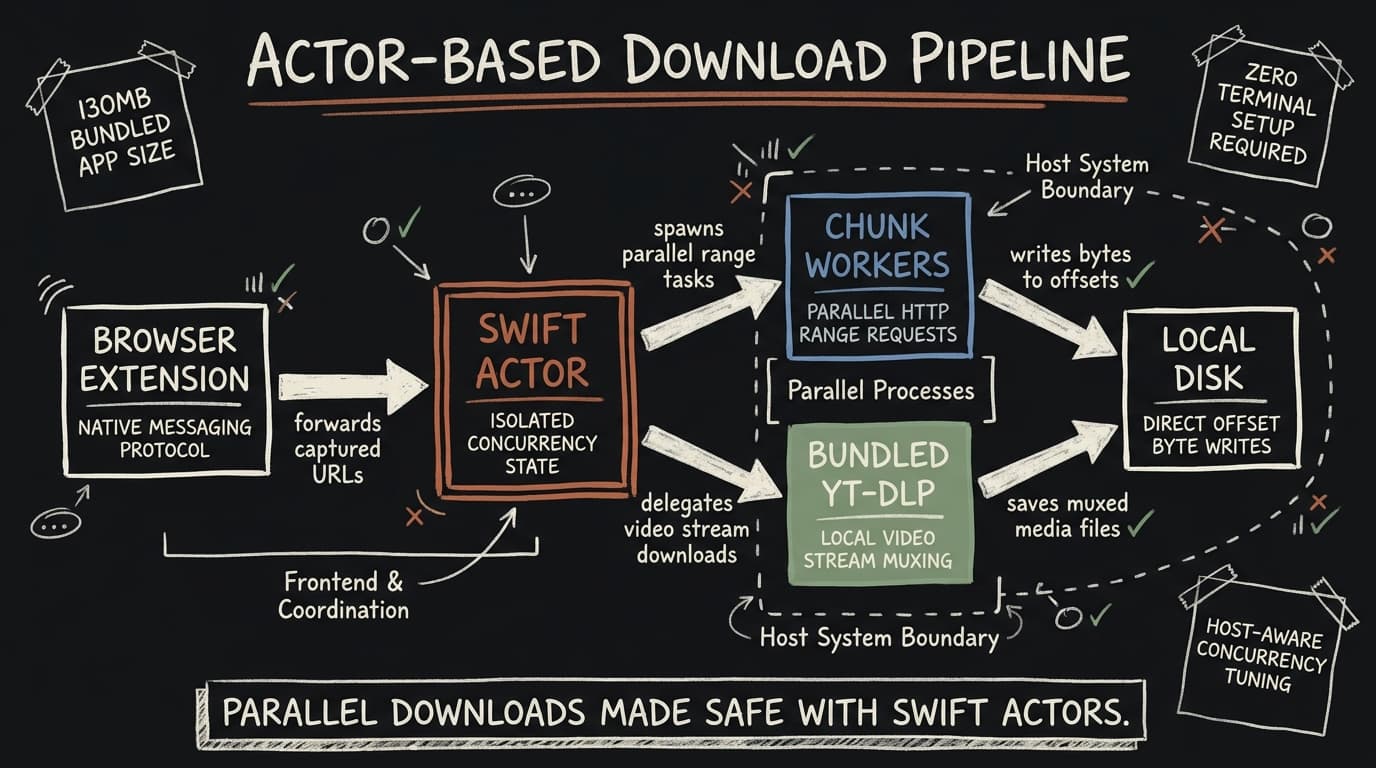
MacGet is a download manager for macOS that I build in public. The pitch is simple: downloads should be fast, you shouldn't have to set anything up, and grabbing a video from the browser should be one click. This post is a build log of how the engine actually works — the parts I'm proud of and the parts that fought back.
Why build another download manager
The browser's built-in downloader opens one connection and waits. On a fat pipe with a server that
throttles per-connection, that leaves most of your bandwidth on the table. The classic fix — IDM on
Windows — never had a clean, free, open-source equivalent on the Mac. So that's the gap MacGet fills:
a free, open-source, multi-threaded download manager that ships as a normal .dmg and works on
macOS 26+ with zero setup.
Chunked downloads, in parallel
The core trick is range requests. A well-behaved HTTP server tells you the total size and accepts
Range: headers, which means a single file can be split into byte ranges and pulled over several
connections at once:
GET /big.iso HTTP/1.1
Range: bytes=0-9999999
MacGet splits a download into chunks, fetches them concurrently, and writes each range to its correct offset in the destination file. The interesting part isn't the splitting — it's deciding how many chunks to run. Too few and you don't saturate the link; too many and you just thrash the server (or get rate-limited). The engine treats concurrency as something to tune per host rather than a fixed constant, because every server has a different idea of how much parallelism it will tolerate.
When a server doesn't advertise range support, MacGet falls back to a single streamed connection. Correctness first, speed second.
An actor-based engine
A download manager is a concurrency problem wearing a UI. You have N downloads, each with M chunks, all mutating shared progress state, all racing to update the same window. In older codebases this is where you'd sprinkle locks and hope.
Swift's actor model made this tractable. The download engine is an actor, so its mutable state —
active tasks, per-chunk progress, the queue — is isolated by the compiler. Chunk workers report
progress back into the actor, and the SwiftUI layer observes a published snapshot. No manual locking,
no data races that compile. The mental model becomes "messages in, state transitions out," which is
exactly what you want when pause/resume and cancellation can land at any moment.
Pause and resume fall out of this naturally: a paused download keeps the bytes it already has on disk, and resuming re-issues range requests only for the chunks that aren't complete.
Capturing downloads from the browser
The feature people actually notice is browser capture. You're on a page, you click a link, and MacGet grabs it instead of the browser. That's a companion Chrome extension talking to the desktop app over Native Messaging — Chrome's mechanism for a web extension to speak to a local binary on your machine, not a server in the cloud.
The extension watches for downloadable URLs (and video manifests), then hands the request — URL, cookies, headers, and a bit of tab context — to the local MacGet app. Everything stays on-device; nothing about your browsing is sent anywhere off your Mac. That on-device boundary is the whole point of the privacy model, and it's why the extension can see cookies and headers without it being creepy: they only ever travel to a process running as you, on your hardware.
Video: handing off to yt-dlp
HTTP files are the easy case. Video is messy — HLS playlists, segmented streams, sites that hide the
real media behind a manifest. Rather than reinvent a decade of edge-case handling, MacGet bundles
yt-dlp (and ffmpeg for muxing) and drives them locally. When the captured URL is a video, the
engine resolves the manifest, downloads the segments, and stitches them into a single file.
Bundling the binaries instead of asking users to brew install anything is a deliberate "zero setup"
decision. The trade-off is app size (~130 MB) and the work of keeping the bundled tools current — but
a download manager that needs a terminal session before it works isn't one most people will keep.
What's next
MacGet 1.2 is the current focus: broader video support, signed auto-updates so the app can ship fixes without a manual re-download, and more host-aware tuning of chunk concurrency. I'll keep posting build logs as those land — including the gnarly bits I glossed over here, like how progress is reconciled when chunks finish out of order.
If you want to try it, MacGet is here, and the source is on GitHub. Bug reports and ideas welcome — that's the whole point of building in public.